Designing a Fair Crew Bonus Program for a Truss Plant
A good bonus program makes crews pull in the same direction as the plant. A bad one teaches them to game the numbers. Here's how to build the good kind.
5 min read
Every bonus program changes eventually. Whether a change reaches back in time or starts today can make the difference between trust and a shop-floor argument.
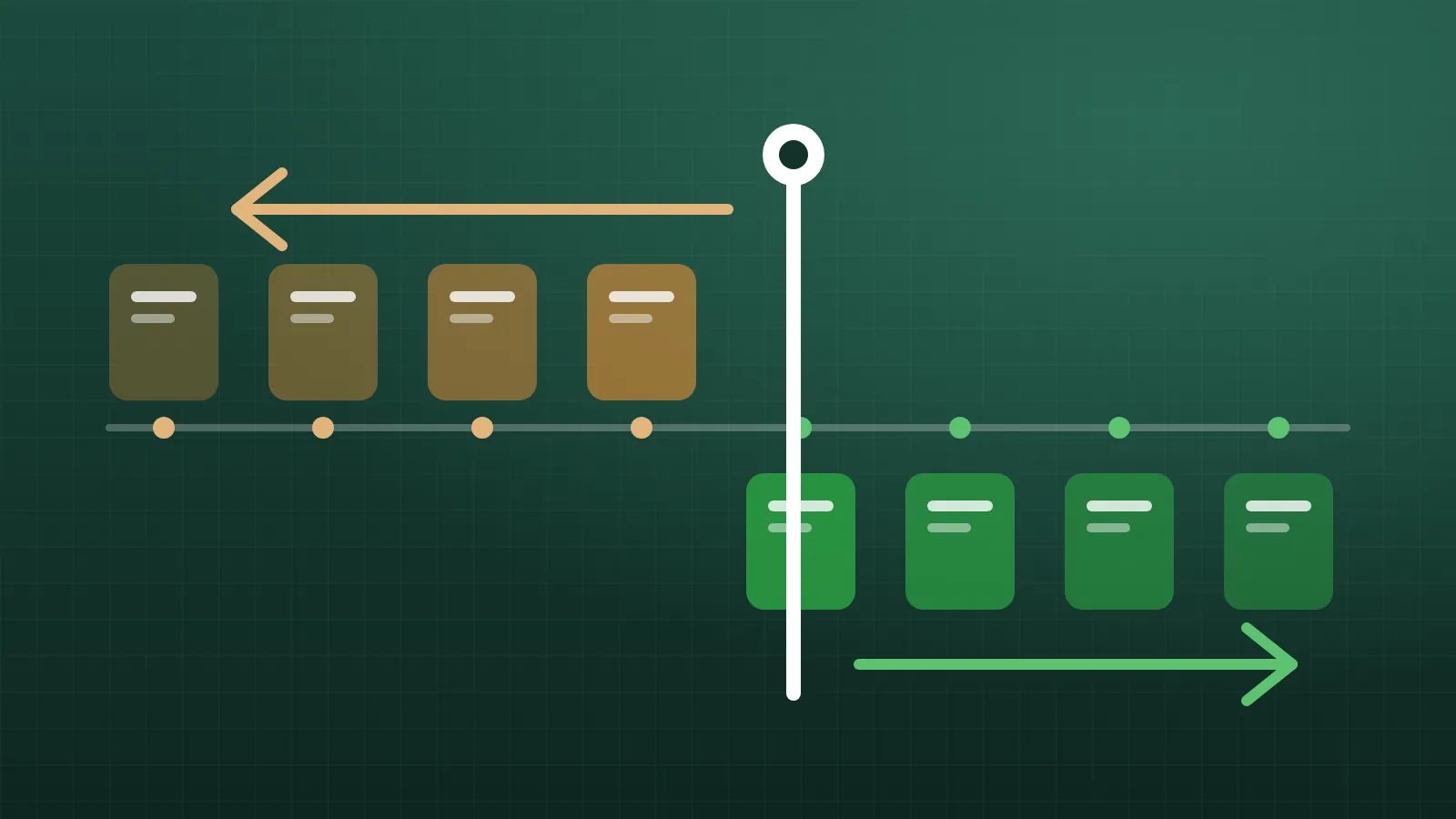
No bonus program survives contact with reality unchanged. The point values turn out to favour one kind of truss. A goal is too easy or too hard. A new product line arrives that the original rules never imagined. Changing the rules is normal and healthy. But every change raises a question that's easy to overlook: does the new rule apply to the past, or only from now on?
This article explains the two options, when each makes sense, and how to handle changes so crews trust the result. As always with pay, check the specifics with your payroll provider or an employment adviser; rules about changing pay and bonuses vary by location.
Retroactive means the new rule is applied to past days as well. Points already earned are recalculated as if the new rule had always been in place, back to a date you choose.
Going forward means the new rule applies only from a chosen date. Past days keep the points they earned under the rule that applied at the time.
Neither is right in every case. The choice depends on why you're changing the rule.
Retroactive changes are usually appropriate when the old rule was a mistake, and applying it was unfair to someone. For example:
Retroactive changes that increase what crews earned are rarely controversial. Retroactive changes that reduce earned points are a different matter. Taking back points people believed they had earned damages trust quickly, and in some places it may raise payroll or legal issues. If an error has over-credited crews, think carefully, and consider applying the fix going forward instead.
Going-forward changes are usually appropriate when the old rule was reasonable at the time and you're changing direction. For example:
In these cases, crews earned their past points fairly under the rules they were told about. Changing those rules after the fact would feel like moving the goalposts, because it would be.
Many changes fall somewhere in between. A useful middle ground is to make a change effective from the start of the current period, such as the start of this week. That fixes the period that's still open without reaching back into weeks that have already been paid.
Whatever you decide, keep a record. Every time a rule changes, you should be able to answer:
This isn't bureaucracy. It's what lets you answer a crew member's question months later ("why did I get fewer points in that week?") with a clear, specific answer instead of a shrug. A system that stores each version of the rules with its effective date can recalculate any period correctly, using whichever rule applied at the time.
The fastest way to lose trust in a bonus program is for crews to discover a change by noticing their points are different. Before any change takes effect:
If a change is a correction in the crews' favour, say so. It's good news.
If you can't explain the change in a sentence, crews won't understand it either.
One of the most common problems is that the choice is never made at all. Someone edits a value in a spreadsheet and the past silently recalculates, or doesn't, depending on how the formulas were built. Nobody decided; it just happened.
A better approach is for the tool to ask the question every time a rule changes: should this apply retroactively, or only going forward? That turns an accidental outcome into a deliberate decision, and it means the person changing the rule has to think about its effect on people's pay.
Use retroactive changes to fix genuine mistakes, especially when they work in the crews' favour. Use going-forward changes when you're changing direction. Consider the start of the current period as a fair middle ground. Keep every version of the rules with its effective date, and tell crews before anything takes effect.
In Truss Plant Portal's crew bonus points, every rule change asks whether it should apply retroactively, recalculating past days, or only going forward, and every version of the rules is kept.
A good bonus program makes crews pull in the same direction as the plant. A bad one teaches them to game the numbers. Here's how to build the good kind.
5 min read
Software that works fine at a desk often fails on the shop floor. Here's what makes a tool usable for people with gloves, noise and no time to spare.
4 min read
AI assistants can now look up jobs, check stock and even draft designs from plans. Here's how to get the benefit without handing over the keys.
5 min read