How it works
From first login to a running floor
Truss Plant Portal follows the way a plant already works. You set it up once, and from then on the paperwork your design software prints keeps it up to date.
- 1
Add your people
An admin creates a personal login for each person in the office, the yard and management, as an admin, editor or viewer. Builders don't need one: they use the crew link.
Learn more - 2
Load your stock
Enter your plate and lumber items once, with counts, what each piece costs and a low-stock level for the sizes that matter. From then on, pick lists keep the counts current.
Learn more - 3
Put jobs on the schedule
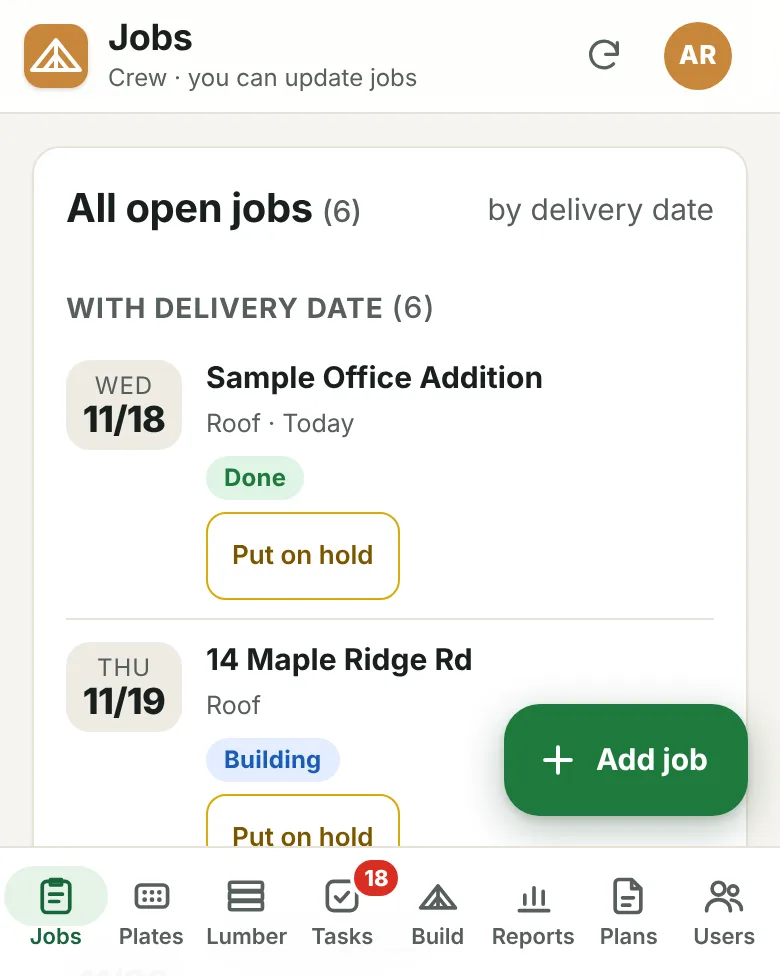
Add each job with its delivery date. The job board sorts open jobs by when they ship, flags late ones, and shows each job's status: picking, cutting, cut in full, building, done or delivered, or on hold.
Learn more - 4
Upload pick lists and build sheets
When a job starts, upload the pick list your design software printed and its plates and lumber come off stock. Upload the build sheets and the house is split into batches by group, with trusses, lumber, plates and joints counted for each.
Learn more - 5
Run the floor
Crews tap Start, Pause and Done on their batches from the crew link. The shop TV shows what each crew is building, and the board updates itself.
Learn more - 6
Review the day and the week
The daily build report shows what was built, by whom and how long it took. Bonus points add up against your daily and weekly goals.
Learn more
Everyone, one picture
The office, the yard and the tables see the same thing
Because everything lives in one place, the schedule the office sees is the same one the yard pulls from and the crews build to. When a crew finishes a batch, the job board, the shop TV and the daily report all know about it.
- Runs in any web browser: phones, tablets, computers and shop TVs
- Changes are signed with the name of the person who made them
- Nothing to install, nothing to update on each device
Common questions
Does it work on phones?
Yes. Every screen is made for a phone first and also works on tablets, computers and a TV in the shop. There's nothing to install: it runs in the web browser.
Do builders need their own logins?
No. Builders use the crew link, which only lets them start, pause and finish batches. The office, yard leads and managers get personal logins.
What can I upload as a pick list?
The pick list your truss design software prints, as a PDF, a scan or a photo. The portal reads it and deducts the plates and lumber on it from stock. If one goes in by mistake, you can undo it.
Can we change the bonus rules later?
Yes. When an admin changes a rule, the portal asks whether it should apply retroactively (recalculating past days) or only going forward. Every version of the rules is kept.
Who can change what?
Admins can do everything, including managing people and bonus rules. Editors update jobs, inventory and builds. Viewers can only look. More detailed custom roles are on the way.
Does it design trusses or replace our engineer?
No. Plans & design review keeps plans, designs and approvals organized, and an AI assistant can help prepare designs, but every truss design must still be checked and approved by your designers and a licensed engineer where required.
What does it cost?
Ask us through the demo request form. We'll talk about your plant and what you need before anything else.
See it with your own jobs
Tell us about your plant and we'll show you the portal with the kind of work you build every day.